05/29/17
Important Things to Know
Q: What all do you use in your setup?
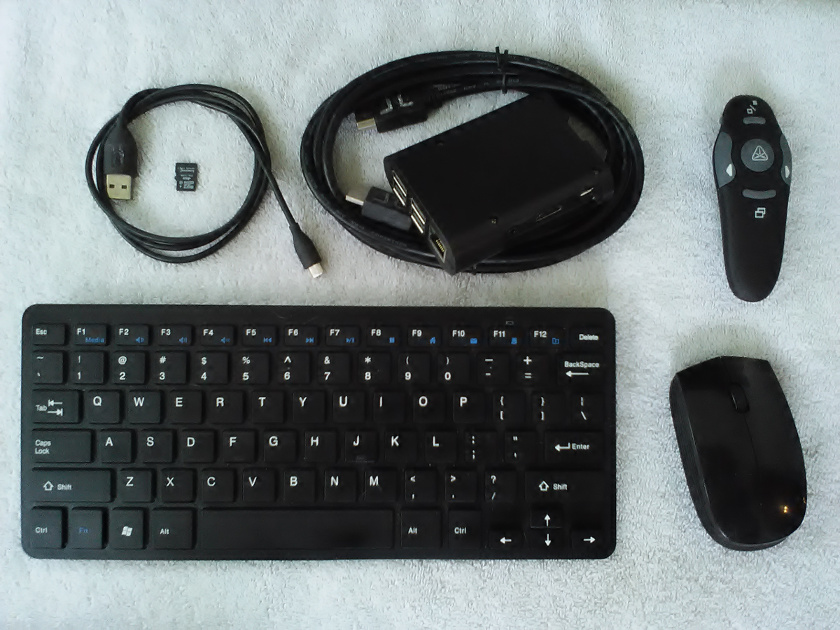
A: I use the Raspberry Pi 3b in a case that resembles a garage door opener. I have a wireless keyboard and mouse. Featured in this photo of my Pi stuff is also a pointer/clicker.
Q: What operating systems does the Pi support?
A: Because Pi uses a RISC processor, not all standard operating systems and software will work, but don't dismay! There are plenty of options, and then some. I use Raspbian, which is the OS developed for this device by its creators. It is a subset of Debian, a popular Linux distribution. You can also use Ubuntu Mate, a very easy and straight forward version of my favorite desktop os. There is also a RISC os, though it is only supported [at present] by the Raspberry Pi 2 and older models. All of the ones I have mentioned so far are free. There is a Microsoft Windows 10 Core available, but it does require that you already have a Window 10 license, or it will not be free. The software included does vary from one os to the next, although they all include enough to do plenty. If you aren't sure, you can make multiple SD cards have different operating systems. They are fairly cheap and it's a great way to explore the differences. See the official list at: https://www.raspberrypi.org/downloads/
Q: How much work is it to set up?
A: Not much. Once you have the image downloaded for your preferred operating system, you simply use a utility (such as Etcher) to burn that image onto a micro SD card. Detailed instructions are provided at: https://www.raspberrypi.org/documentation/installation/installing-images/README.md That's it! Once the image is ready, you can put it into the Pi and begin using it immediately!
Q: Where can I get one?
A: Although there are many vendors on the internet that carry these awesome devices, I like Ada Fruit because they are a direct supplier, and they have a ton of accessories, including my favorite Keyboard! Here are some links. No, I do not get commission, but if you type my name into the discount code at check out, maybe they will consider it. :)
Raspberry Pi - ala carte
Wireless Keyboard only
Wireless Keyboard with mouse - single dongle
they have a plethora of cases available!
Pointer/Clicker
Remember, that Pi comes with nothing. You will need a power cord, similar to the current Android charger, and a micro SD card. Any USB keyboard and mouse will work, but wireless is much more professional for presentations.
Q: Will this thing use just any micro SD card?
A: At present, they do not recognize anything over 64 Gb. Also, there are a lot of cheap knock off SD cards available online. that being said, you can kill two birds with one stone if you buy an SD card that already has the installer image. Noobs is not an actual operating system, but rather it helps you select the OS you want and installs it to the SD card for you. You can pop this card into your Raspberry Pi and it will walk you through the whole thing. Easy Peasy.
8 GB SD card with Noobs
The only video output available on this device, by default, is an HDMI port. You may want an extra HDMI cable just for this device. There is an optional display accessory that will wire directly onto the Pi board. If you plan to do this, get a case that has the slots for the cable!
That is it, for now. You have enough information now to acquire a Raspberry Pi and get it up and running. At some point, I will add some projects to this page, but you can find plenty of ideas online, especially on AdaFruit's website. The stuff I am doing with mine is still a little different than what they get into, so I will be back with more! |
05/20/17
There is a new kid on the block, and it's growing up to be the new Sherriff in town. The Raspberry Pi is an amazing device. It is an actual computer. That's right, it [Rasperry Pi 3b] has a quad core cpu and 1 gig of ram. It uses an SD card for a hard drive, so you can have 16, 32 or 64 gigs of hard drive space, although you can do plenty even with 8 gigs or less. This computer has built in WiFi and BlueTooth. It features 4 usb ports and hardwire network port. It also has general input/output pins, which can be used to integrate sensors, motors and controls.
There is not much this thing cannot do, besides play Netflix, which is just a browser support issue at the time of this writing, and I expect that to change soon. This computer is issued to every student in the UK because of it's low cost and the variety of software included for FREE with most of it's supported operating systems, including programming tools for Java and Python development, and Scratch. Minecraft is there too, and with more than 1 pi, users on the same network can interact in the same world and build stuff together. As I said, there is not much this device cannot do, so let's talk more about it.
|
